

Download Ideal Blog Creator – Easy HTML Blog Builder for Windows
Overview
Ideal Blog Creator is a lightweight, user‑friendly desktop application that streamlines the entire lifecycle of a blog—from drafting HTML posts to publishing them online. Designed exclusively for Windows, the software removes the technical friction often associated with static‑site blogging, allowing beginners and seasoned developers alike to focus on content rather than code. The interface is organized into four intuitive tabs: HTML editor, category manager, post creator, and publish panel.
Built‑in RSS support keeps readers automatically updated whenever you push new content. Whether you envision a simple personal journal or a richly structured multi‑category site, Ideal Blog Creator offers the flexibility to tailor your blog’s architecture while still providing a visual preview that generates a local HTML file before you go live. The tool’s emphasis on security, free updates, and a minimal learning curve makes it an ideal choice for anyone looking to launch a professional‑grade blog without the overhead of a full‑stack CMS.
Key Features
- Four‑tab workflow: dedicated sections for raw HTML, category organization, post composition, and publishing.
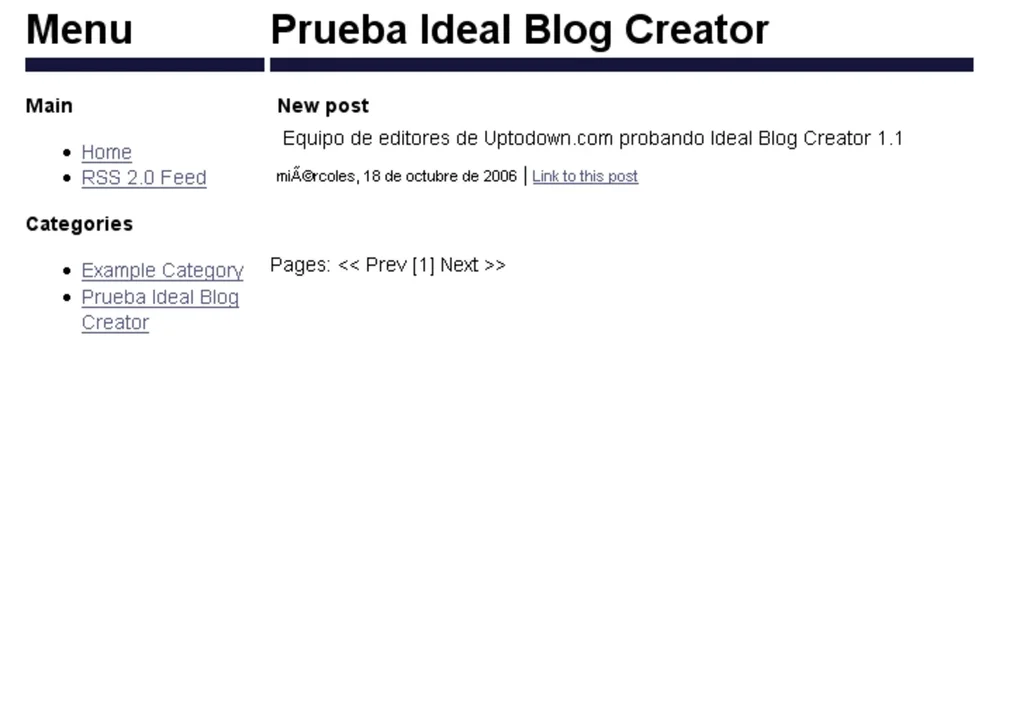
- Instant local preview – generate a complete HTML file and view it in any browser before publishing.
- Built‑in RSS feed generation to keep subscribers automatically informed of new posts.
- Drag‑and‑drop media handling for images, videos, and downloadable assets.
- Customizable template engine – modify the default layout or import your own HTML/CSS theme.
- Automatic sitemap creation for better SEO performance.
- One‑click export to FTP or cloud storage services for seamless online deployment.
- Free updates that add new HTML snippets, SEO tools, and security patches.
Installation, Usage & Compatibility
Getting started with Ideal Blog Creator is straightforward. Download the installer from the official website, then run the .exe file. The setup wizard guides you through standard steps—accepting the license agreement, choosing an installation folder, and creating a desktop shortcut. Because the application is built on native Windows APIs, it runs smoothly on Windows 10, Windows 11, and earlier versions back to Windows 7 (though we recommend the latest OS for optimal performance).
After installation, launch the program and you’ll be greeted by the four‑tab dashboard. Begin by defining your blog’s categories in the “Categories” tab—these act as folder structures that will be reflected in your final URL hierarchy. Switch to the “HTML Editor” tab to write or paste raw HTML code; the editor offers syntax highlighting, auto‑completion, and a live preview pane.
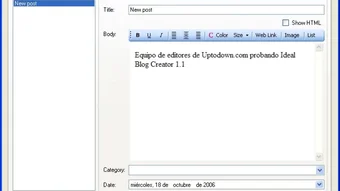
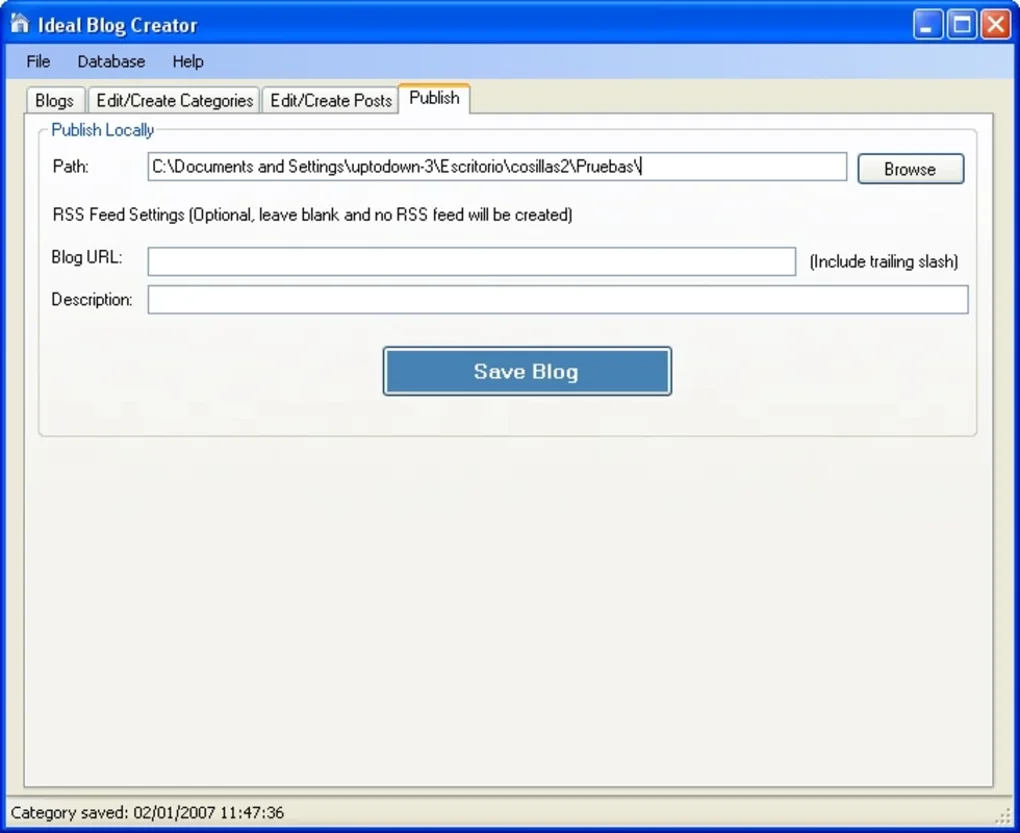
Next, use the “Post Creator” tab to compose individual entries. Here you can add titles, meta descriptions, tags, and attach media files. The system automatically injects the appropriate RSS tags and updates the sitemap. When you’re ready to publish, move to the “Publish” tab, where you can either generate a local HTML file for manual upload or configure FTP credentials for direct deployment. All settings are saved in a lightweight configuration file, making it easy to transfer your blog setup to another Windows machine.
Pros & Cons
Pros
- Intuitive four‑tab interface reduces the learning curve for new bloggers.
- Full control over HTML allows for custom designs without being locked into a proprietary template.
- Built‑in RSS and sitemap generation improve SEO and audience engagement.
- Local preview ensures you catch layout issues before going live.
- Free, regular updates keep the software secure and compatible with modern web standards.
Cons
- Currently Windows‑only; macOS and Linux users must rely on virtualization.
- No built‑in WYSIWYG editor for those who prefer drag‑and‑drop page building.
- Advanced features such as multi‑user collaboration are not supported.
- Requires manual handling of web hosting; no integrated hosting solution.
Conclusion & Frequently Asked Questions
Ideal Blog Creator delivers a balanced blend of simplicity and power for anyone who wants to build a static HTML blog without diving deep into server‑side technology. Its clear tabbed workflow, automatic RSS support, and reliable preview capabilities make it a solid choice for hobbyists, writers, and small‑business owners alike. While the Windows‑only limitation may deter some, the overall value—especially given the free updates and lack of subscription fees—places it among the top desktop blogging tools in its niche. Ready to launch your personal journal or professional blog? Download Ideal Blog Creator today, follow the quick installation steps, and start publishing your voice on the web.
FAQ
Can I use Ideal Blog Creator on a Mac?
Currently the software is built for Windows only. Mac users can run it via a Windows virtual machine or Boot Camp, but a native macOS version is not available yet.
Is there a free trial or is the program free?
Ideal Blog Creator is offered as a free download with optional paid upgrades for premium templates. All core features are available at no cost.
How does the RSS feed work?
Each time you publish a new post, the software updates an XML RSS file located in your blog’s root folder. Readers can subscribe to this feed using any standard RSS reader.
Can I host my blog on a free platform like GitHub Pages?
Yes. After generating the local HTML files, you can push them to a GitHub repository and enable GitHub Pages to serve your site for free.
Do I need any coding experience to use Ideal Blog Creator?
Basic HTML knowledge is helpful but not mandatory. The program’s structured tabs guide you through each step, and you can start with simple text posts before adding custom HTML.
Overall Rating: ★★★★☆ (4.3/5) – Ideal Blog Creator offers a secure, free, and highly customizable solution for Windows users who want to launch an HTML‑based blog quickly and efficiently.







